Clinic owners
Wants the numbers to be true without asking anyone to prepare them, and wants them comparable across locations.
The phrase covers everything from a shared calendar to a platform an entire group runs on. The difference is not the feature list — it is whether the parts share one record, so that treating a patient, billing for it and reporting on it are the same act.
Most clinics do not start with a system. They accumulate one: a calendar, a spreadsheet for money, a WhatsApp group for coordination, paper for consent, and an accountant who reconciles it afterwards. Each piece works. The cost is in the seams.
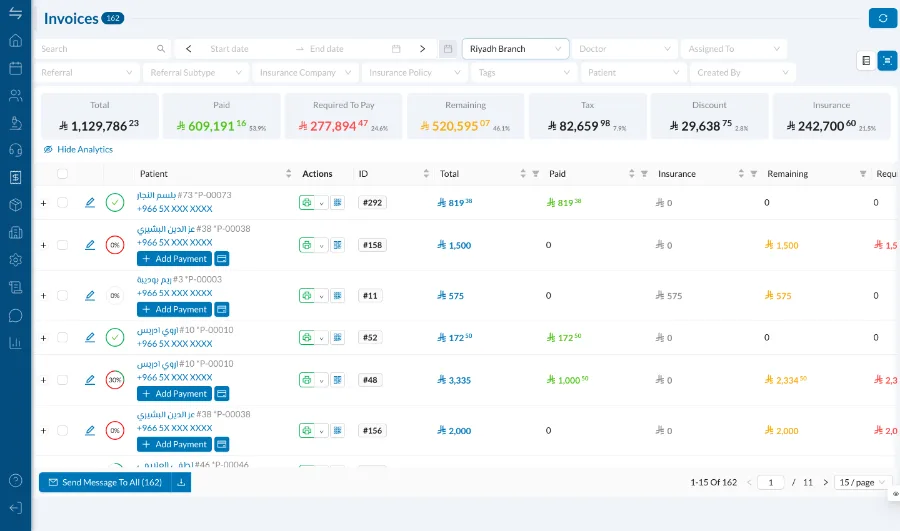
Clinic management software is usually sold as a list. It is more useful to read it as four jobs, because a system that does three of them well is still a system you will replace.
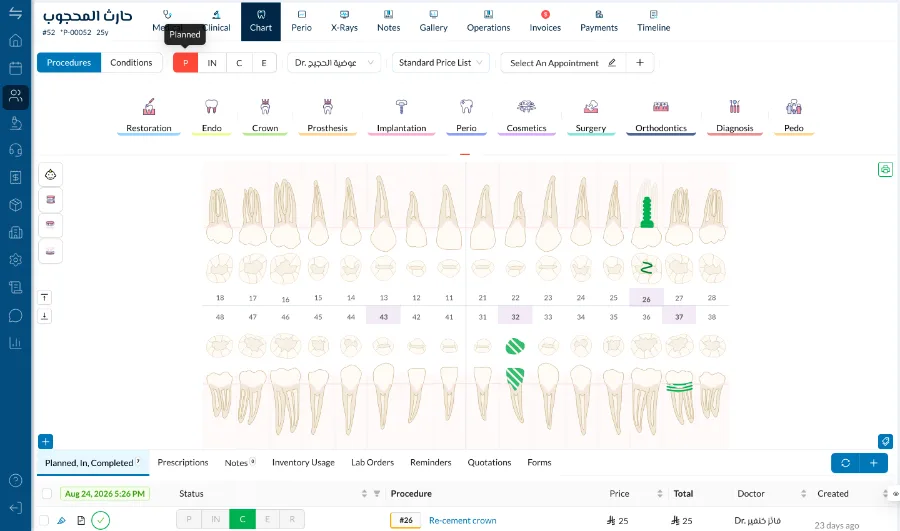
Plenty of products are marketed as clinic management software and are, underneath, an appointment book with invoicing attached. The distinguishing questions are boring and answer themselves quickly.
The two terms are used interchangeably and mostly are. Where they differ in practice is scope: practice management tends to describe a single site, clinic management increasingly means several, with the reporting and permissions that implies.
The same system is bought by one person and lived in by another, which is why evaluating it alone is the most common mistake.
Wants the numbers to be true without asking anyone to prepare them, and wants them comparable across locations.
Wants the clinical record to be fast enough to use during treatment rather than after it.
Wants the common actions to take fewer steps, because they do them forty times a day.
Nearly every clinic starts with the left-hand column. It works until the clinic grows enough that the seams cost more than the software would.
They are the same thing, and clinics type all three. One practice, a dental centre with several chairs, or a group with branches in more than one city run on the same account; what changes is how many branches and permission levels are switched on. A group sees every branch in one report and each branch sees its own day.
Software that runs the whole clinic from one record: scheduling and clinical charting, invoicing and payments, insurance, stock and lab cases, staff and payroll, and the reporting over all of it. The defining property is that the parts share data rather than being separate tools that exchange it.
In most usage, none. Where they differ, practice management tends to describe a single site while clinic management is used for groups, which mainly changes what the reporting and permissions have to do.
Four areas: clinical records, daily operations, the commercial side, and management reporting. A system strong in three of the four is one you will replace within a few years.
Yes, built specifically for dental clinics and dental groups. Everything from scheduling and charting through to payroll, insurance and multi-branch reporting runs on one record.
You can connect several, and many clinics do. The question is who maintains the connections, and what happens to your reporting on the day one of them changes.
Most clinics are live within a few days. The work is migration and configuration rather than installation, and the part worth planning is which historical data comes across.
Thirty minutes on how your clinic actually runs, not a generic slideshow. We will call you within 24 hours.