Dentist production and collection report
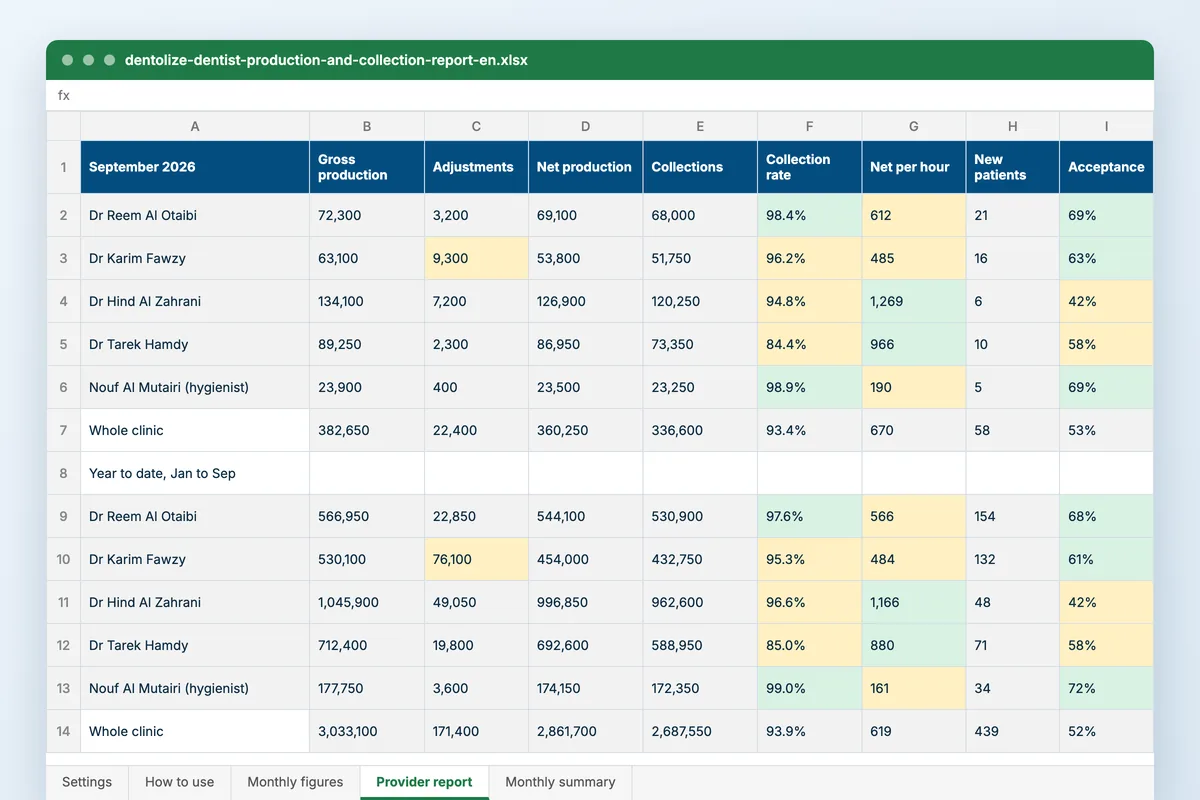
Five numbers explain most of a dental clinic’s month: what each dentist produced, what came off it in discounts, what was collected, what an hour in the chair earned, and how much of the treatment presented was accepted. This workbook puts them side by side, per provider and per month.
Download
FreeNo sign-upDownloads directlyExcel and Google Sheets
What is inside
| Settings | Your dentists and hygienists with their roles, the first month of your year, and targets for the collection rate, treatment acceptance, adjustments and net production per clinical hour. |
|---|---|
| Monthly figures | One row per provider per month: gross production, adjustments and discounts, collections, clinical hours, new patients, and the value of treatment presented and accepted. Net production, adjustment share, collection rate, net per clinical hour and acceptance rate are worked out. |
| Provider report | Pick a month: every provider side by side for that month and for the year to date, coloured green or amber against your targets. |
| Monthly summary | The clinic’s year month by month, with a chart of net production against collections and one of the collection and acceptance rates. |
How to use it
Set your targets
Collection rate, acceptance, adjustments and net per hour.
Enter each month
A row per dentist and hygienist from your month-end figures.
Read the provider report
Who is under target, and on which of the five numbers.
Watch the year
Net production against collections, and where the gap opens.
Who it is for
Clinic owners and managers who review dentists every month, and dentists paid on production or collections who want to see the figures behind their pay. It opens on nine months of a four-chair clinic: one dentist discounts about a seventh of what he produces, the implant dentist presents the biggest plans and has the lowest acceptance, and the orthodontist’s collections trail production because fees are paid in instalments.
Read next
Analytics
Track performance, spot problems early and make decisions that grow the clinic. Dentolize reports on revenue, operations, patients and…
Read more In DentolizeSalaries
Salaries, doctor commissions, deductions and payslips calculated from the treatments and payments already recorded. Payroll built into Dentolize.
Read more From the blogDental clinic KPIs: 12 numbers worth reviewing every week
Revenue is the number everyone looks at, and it is the last number to move. Weeks earlier, smaller numbers move: a chair empty two hours a…
Read moreMore free files
Questions
What is the difference between production and collections?
Production is the treatment done, at your list prices. Collections are the money that came in that month, whenever the work was done. The gap between them is discounts, unpaid balances and timing.
Why measure per clinical hour?
Because a dentist with more chair time will always produce more. Net production per hour in the chair compares dentists fairly. Read a hygienist against a lower mark: hygiene earns less per hour by design, so amber there is expected.
What counts as treatment presented?
The value of the treatment plans the dentist gave patients that month; accepted is the value the patients agreed to. The ratio is the acceptance rate.
Does it work in Google Sheets?
Yes. Upload it to Google Drive and open it with Google Sheets. The charts open there too.
The report that writes itself at month end
Dentolize reports revenue and collection rate by doctor and by procedure from the treatments and invoices already recorded, and pays commission on production or collections from the same figures.