Dental chair utilisation tracker
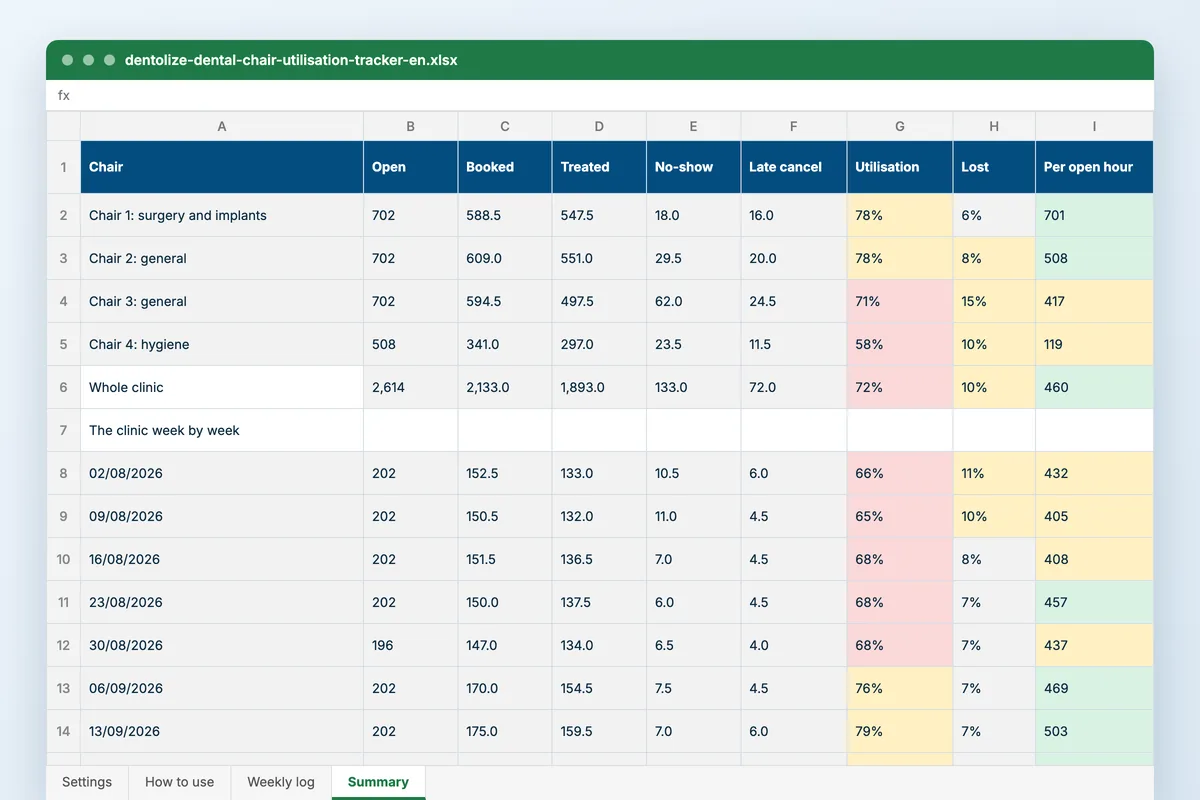
A dental chair earns nothing while it is empty, and most clinics only know it is empty when the month’s figures disappoint. This workbook records each chair’s week in hours (open, booked, treated, lost) and shows utilisation against your target, chair by chair and week by week.
Download
FreeNo sign-upDownloads directlyExcel and Google Sheets
Rather fill it in on screen? Dental chair-hour cost calculator
What is inside
| Settings | Your chairs, the utilisation target and the amber mark below it, and the production you expect from each open chair-hour. |
|---|---|
| Weekly log | One row per chair per week: open hours, booked hours, treated hours, no-show hours, late-cancellation hours and production. Booked share, utilisation, lost hours and their share of what was booked, unbooked hours, and production per open and per treated hour are worked out. |
| Summary | The chairs side by side over the weeks you choose; the whole clinic week by week for thirteen weeks, with a chart of utilisation against target; and each chair’s utilisation month by month. |
How to use it
Name your chairs
And set the utilisation target and the production per open hour you expect.
Log each chair weekly
Hours open, booked and treated, the hours lost, and production.
Compare the chairs
Utilisation, lost hours and production per hour, side by side.
Follow the trend
Week by week against target, to see whether a change worked.
Who it is for
Owners and managers of clinics with three or more chairs who suspect one of them is idle more than it should be. It opens on thirteen weeks of a four-chair clinic: the hygiene chair runs well under target because the recalls that should fill it were never booked, one general chair loses about one booked hour in seven to no-shows and late cancellations until reminders start in mid-August, and August is quieter everywhere.
Read next
Analytics
Track performance, spot problems early and make decisions that grow the clinic. Dentolize reports on revenue, operations, patients and…
Read more From the blogDental chair utilisation: how to fill the chair, not the diary
A full diary and a chair empty half the day: that is the state of most dental clinics. Appointments are booked on the dentist, but the…
Read moreMore free files
Questions
What counts as utilisation?
Hours a patient was actually in the chair, divided by the hours the chair was open and staffed. Booked hours that ended as no-shows do not count, which is the point.
Where do the hours come from?
From the appointment book: the chair’s session hours, the length of the appointments booked in it, and the ones that did not happen. A rough weekly count is enough to see the pattern.
What target should I set?
Many clinics aim for 80 to 90 per cent of open hours treated. Set yours on Settings; amber and red follow it.
Does it work in Google Sheets?
Yes. Upload it to Google Drive and open it with Google Sheets. The chart opens there too.
Utilisation without the counting
Dentolize reports chair utilisation per room and per session, with cancellations and no-shows per patient and per doctor, from the calendar the front desk already keeps.