Dental lab case tracker
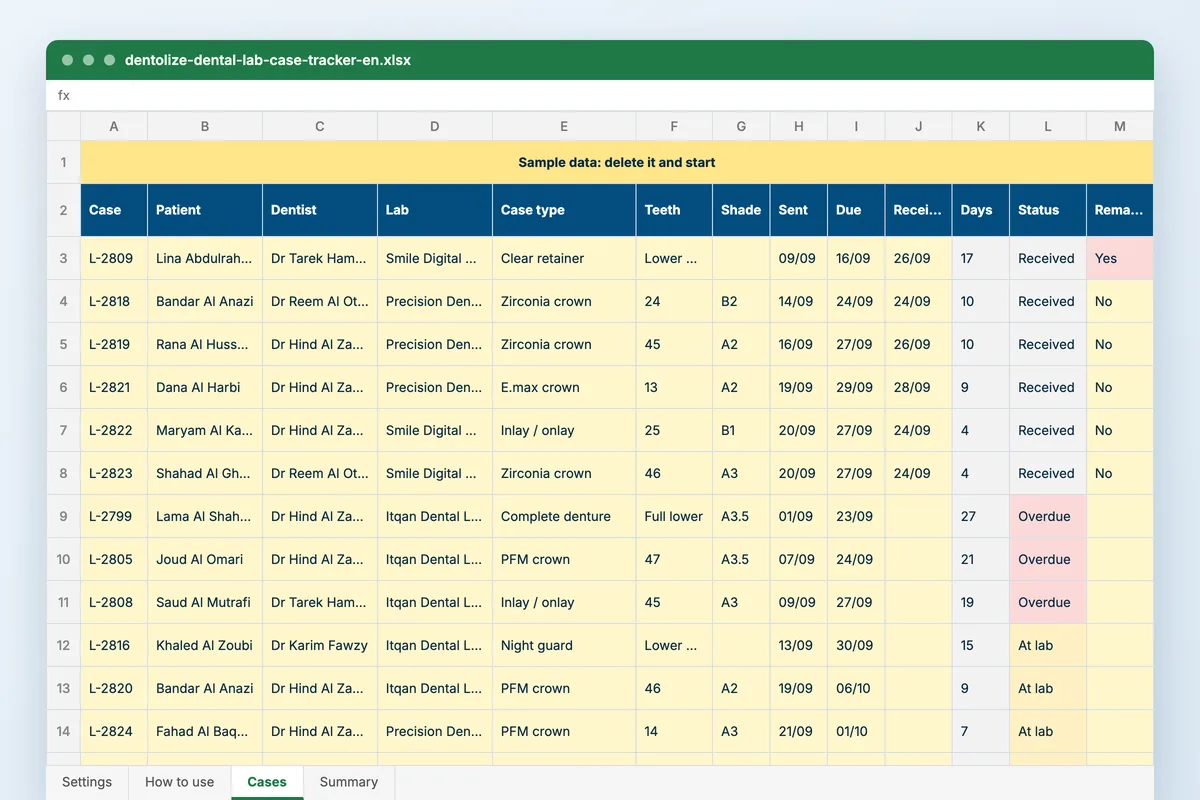
One row per case sent out, from the impression to the fit. The sheet tells you which cases are late before the patient is in the chair, and the summary tells you which lab is slow, which remakes and why, and what the labs cost you against what you charged.
Download
FreeNo sign-upDownloads directlyExcel and Google Sheets
Rather fill it in on screen? Dental lab work order
What is inside
| Settings | Your dentists, your labs, case types (zirconia and E.max crowns, bridges, implant crowns, veneers, dentures, night guards), try-in results, remake reasons, and the date the sheet counts from. |
|---|---|
| Cases | Case number, patient, dentist, lab, case type, teeth in FDI, units, shade, dates sent, due and received, the try-in or fit result, remake and reason, lab cost and the fee charged. Days at the lab, status (at lab, overdue, received), days late and margin are worked out. |
| Summary | Each lab: cases, average days at the lab, the share back on time, overdue now, remake rate and cost as a share of fees. Each dentist: remakes, and how many came from the impression or scan. Remake reasons, and six months of lab cost against fees with a chart. |
How to use it
List your labs
Add the labs you use, your dentists and the case types you send.
Log each case as it leaves
Patient, teeth, shade, the date sent and the date the lab promised.
Close it when it fits
Received date, the try-in result, and the reason if it had to be remade.
Read the summary monthly
Turnaround, remakes and cost by lab, then remakes by dentist.
Who it is for
Practice managers and dentists who send crowns, bridges and dentures to more than one lab and want to know which one to send the next case to. It opens on a four-dentist clinic over six months: the cheapest lab is also the slowest and remakes about one case in six, and one dentist’s remakes are mostly impression and scan problems. A remake rate by dentist, not only by lab, is the comparison most clinics never make.
Read next
Lab orders
Send cases to the lab, track due dates and receive work back against the patient. Dentolize links lab orders to the tooth, the invoice and…
Read more From the blogDental lab orders: from impression to fitting without a lost phone call
The patient arrives for the crown fitting and the crown has not come back from the lab. Someone calls, the lab says "tomorrow", the patient…
Read moreMore free files
Questions
How do I record a remake?
Keep the case on its own row. Choose Yes under Remade and pick the reason; the received date is when the final work arrived, so the days at the lab include the remake.
Why FDI tooth numbers?
Most labs and clinics in the region use them. The teeth column is free text, so 36 or 14, 15, 16 both work, and so does Full upper for a denture.
Does it work in Google Sheets?
Yes. Upload it to Google Drive and open it with Google Sheets. It uses COUNTIFS, SUMIFS and AVERAGEIFS, which both handle.
Do I have to type patient names?
No. Use the file number alone if you prefer. The file stays on your computer or your own Drive; nothing you type reaches Dentolize.
Lab cases attached to the tooth
In Dentolize a lab order is created from the chart with the tooth and shade on it, the due date shows on the appointment, and the lab fee lands against the case it belongs to.